In today’s post I want to walk through a fascinating indexing technique for data lakehouses which flips the role of the index in open table formats like Apache Iceberg and Delta Lake.
We are going to turn the tables on two key points:
Indexes are primarily for reads. Indexes are usually framed as read optimizations paid for by write overhead: they make read queries fast, but inserts and updates slower. That isn’t the full story as indexes also support writes such as with faster updates and deletes in primary key tables but the dominant mental model is that indexing serves reads while writes pay the bill.
OTFs don’t use tree-based indexes. Open-table format indexes are data-skipping indexes scoped to data files or even blocks within data files. They are a loose collection of column statistics and Bloom filters.
Qbeast, a start-up with a presence here in Barcelona where I live, is reimagining indexes for open table formats, showing that neither assumption has to be true.
Let’s dive in.
Layout, layout, layout
A few weeks ago I wrote Beyond Indexes: How Open Table Formats Optimize Query Performance which describes how the open table formats don’t use monolithic tree-based indexes as RDBMS’s do, instead they optimize performance via effective pruning which in turn is boosted by data layout that matches the most important queries.
The open-table formats give us two logical levers for optimizing layout:
Partitioning
Sort order
Together, these form what is often called clustering: the way a table physically organizes data for efficient scanning by clustering similar data together.
Partitioning is the first major clustering lever in Iceberg and Delta tables. It divides a table into logical groups based on one or more columns so that rows with the same partition key values are stored together. This creates data locality, allowing the engine to quickly identify which partitions match a query filter (e.g., WHERE EventDate = '2025-10-01') and skip the rest. That process, called partition pruning, avoids scanning irrelevant data and greatly speeds up queries.
Within partitions, we can sort the data using a sort order. We can use one or more columns (including transforms of columns) as the sort order, which determines the order of rows in data files, and even across data files after compaction work (within a given partition). The Iceberg spec allows you to specify multiple columns as a lexicographical sort order and Delta goes further by supporting Z-order. However, Spark can also compact Iceberg using Z-order (it’s just not in the spec).
Let’s take an example of rows with the following x and y indexed columns: where x has the domain a-d and y has the domain 1-4, producing 16 (x,y) pairs, such as (a, 1), (a, 2)...(d, 4).
When you sort a dataset lexicographically by multiple columns, the data system arranges the rows first by x, and then by y within each x group. That works fine if most queries filter heavily on the first column, but it doesn’t take into account how the data relates across both dimensions. Two records that are close together in (x, y) space might end up far apart on file if their x values differ slightly.
Fig 1. Lexicographical order of two dimensions, which follows the “sort by x then by y” order.
Z-ordering improves multidimensional sorting by weaving the bits of all indexed columns together into a single scalar value. Sorting by this scalar value produces a Z-shaped curve which fills the dimensional space (hence Z-order being what is known as a space-filling curve). The result is an ordering where items that are close in N-dimensional space remain close in the 1-D key space as well. As a result, it reduces I/O for multi-column range filters and is ideal when queries commonly span multiple dimensions rather than a single dominant one. If you always query on a leading column, then lexicographical sort order is likely better.
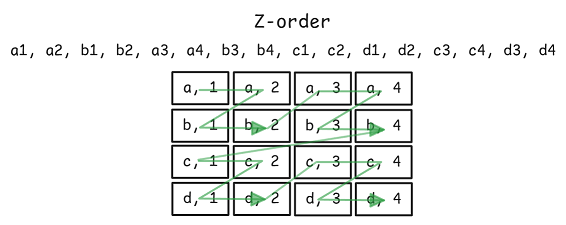
Fig 2. Z-order uses bit mixing to produce a single scalar sort key, which determines the order, which resembles a z-shaped space-filling curve.
But there are some problems with this clustering strategy based on partitioning + sorting strategy:
Partition granularity. The partition key must be chosen carefully: too many partitions lead to many small files, which can hurt performance instead of helping it.
Imbalanced partitions. Your data may be skewed, leading to imbalanced partition sizes. Some might be very small, while others might be very large, which is inefficient and can lead to uneven performance.
Changing distributions. The shape of your data may change over time, making your chosen partitioning strategy less effective over time.
Drift. Your tables are constantly drifting away from the optimum clustering layout as new data arrives. Compaction is constantly working to cluster recent data. Global clustering is expensive, so clustering is usually performed on subsets of the data.
What if we could use a data layout strategy that was flexible and adaptive (solving pain points 1, 2, 3) and didn’t constantly drift as new data arrived (solving pain point 4)?
Enter the Qbeast and the OTree multidimensional indexing approach which came out of research of the Barcelona Supercomputing Center. Qbeast has been on my radar because one of the founders is Flavio Junqueira, a distributed systems researcher behind both Apache ZooKeeper and Apache BookKeeper (both of which have played large roles in my career).
Using the OTree index to govern table layout
The OTree brings to open table formats a global tree index that defines the table’s structure and layout. In some ways, the OTree could be thought of as a distant relative of the clustered index in the RDBMS world as they both define the table layout. However, the OTree is a lightweight structure that does not try to organize individual rows.
The OTree index approaches table layout as an adaptive spatial structure. Instead of dividing data according to fixed partition keys or grouped according sort orders, it organizes the dataset into hypercubes that subdivide automatically as the data distribution demands. Each (hyper)cube represents a region in multi-dimensional space defined by the indexed columns.
Fig 3. A table indexed on three columns leads to a 3-dimensional (normalized) space (more on that later). In this figure, the original cube has subdivided into 8 subcubes.
A cube divides along all indexed dimensions simultaneously, creating 2ᵈ smaller cubes, where 𝑑 is the number of dimensions (i.e., the number of indexed columns).
So for example:
With 2 indexed columns, each division produces 4 subcubes (2×2 grid)
With 3 indexed columns, each division produces 8 subcubes (2×2×2)
With 4 indexed columns, each division produces 16 subcubes (2×2×2×2)
Fig 4. A cube subdivides into 8 subcubes (in a 3-dimensional space) corresponding to three indexes columns.
Using 3-dimensional space is taxing on the mind and diagrams, so I’ll use examples based on two indexed columns which leads to an easier to visualize 2-dimensional space.
Each row is mapped to a point in multidimensional space
The number of dimensions corresponds to the number of indexed columns. If we index our products table by price and rating, then we have a two-dimensional space.
Qbeast maps each row to a point in a multidimensional space by normalizing the values of the indexed columns into the 0,1 range, preserving their relative order so that nearby data in each dimension remains close together in space.
Fig 5. Two dimensional space with normalized domains
For example, if we index columns price and rating, a row with (price=100, rating=4.2) might map to coordinates (0.10, 0.84) in the 0,1 space (of each dimension), while another with (price=120, rating=4.3) becomes (0.12, 0.86). Because both rows are close in their normalized coordinates, they occupy nearby positions in the multidimensional space, thereby preserving the natural proximity of their original values. This is really important because the spatial locality should reflect the value locality within the data domain, else range scans won’t be very useful.
This is precisely what the Z-order mapping function tries to do as well (by bit mixing). The difference is that a space-filling curve (like Z-order or Hilbert) takes multi-dimensional coordinates (x, y, z) and projects them onto a one-dimensional ordering, whereas Qbeast preserves the ordering per dimension.
Adaptive cube division
A cube is one subdivision of the multidimensional space. At first, all data falls into a single cube representing the full range of values (0-1 of each dimension). As new data arrives and the cube reaches a predetermined size, it generates subcubes, each covering a more specific region of the domain. This cube division continues, producing finer and finer cubes.
The result is a layout that mirrors the actual distribution of the data. Skewed data that clusters around a tight set of values is located in dense regions of space, located in finer and finer cubes, while sparse regions remain coarse.
Fig 6. Cubes adaptively subdivide recursively based on multidimensional spatial density.
In figure 6 above, we get the following set of splits:
Root cube is created
The root cube divides in half by both dimensions, creating four subcubes (0, 1, 2, 3).
Subcube 3 fills up and divides into subcubes (30, 31, 32, 33)
Subcube 30 fills up and divides into subcubes (300, 301, 302, 303)
Now it’s time to map this spatial representation to the tree. Because of how the cubes subdivide into two halves along each dimension, the cube id (such as 301) encodes its position and normalized domain bounds (along each dimension).
The OTree
This multidimensional space, divided up adaptively into multiple levels of subcubes, is represented by a tree.
Fig 7. The OTree representation of the cubes.
We can visualize the progress of a single root cube to the final set of cubes as follows.
Fig 8. The OTree over time.
Next let’s look at how this translates to Apache Iceberg and its data files.
The OTree Index and the Open Table Formats
Up to this point we’ve been talking about cubes, multidimensional space, and trees in abstract terms. But let’s ground ourselves and see how all this maps onto an Iceberg table or Delta table.
The OTree governs layout, but Iceberg/Delta remains the source of truth about the canonical set of data files and their metadata. Writers (such as a Spark job for ingest) consult the OTree but readers (such as a Spark analytics job) only read Iceberg/Delta metadata. This separation allows the index to be invisible to all engines (Spark, Flink, Trino etc), requiring no special integration.
Each node of the OTree corresponds to a cube, which in turn contains one or more blocks, where each block points to a data file (such as a Parquet file).
Fig 9. Each node of the OTree contains one or more blocks, where each block is a data file (such as Parquet). In this example, the root cube reached capacity with three files and split along 2 dimensions.
Notice that the data does not exist only in leaf nodes, but all nodes of the tree. The deeper into the tree you go, the narrower value range across the dimensions each node represents. Any given data point may exist in any node from the root, down to the lowest leaf that covers the data point.
Fig 10. The data point maps onto the nodes: root, 3, 30 and 302. A query whose filter predicates cover this point may end up reading each of these files (it depends on the column stats).
As I said in my previous blog post on OTF performance, the Iceberg column statistics reflect the layout of the data. We want narrow column stats for effective pruning, which means producing a data layout with data locality. The OTree provides that method of obtaining data locality according to one or more indexed columns (the dimensions of our multidimensional space). But readers carry on using the standard column statistics and bloom filters as usual.
So, the OTree index governs the table’s layout but it doesn’t replace Iceberg or Delta’s metadata or data files. The two systems coexist:
The OTree index describes how the data should be organized: which regions exist, their spatial boundaries, and which data points fall into each.
Iceberg/Delta’s metadata remains the authoritative catalog of what files exist and their stats.
In Iceberg, the OTree index is stored as a Puffin file which is referenced in the Iceberg metadata (so the OTree is committed as part of the Iceberg commit). Each commit may result in a new version of the OTree.
Fig 11. A very simplified representation of four Iceberg commits which add one Parquet file per commit. The root cube splits in the 3rd snapshot, writing to one subcube, and another subcube in snapshot 4.
In DeltaLake, the OTree metadata is included within tag metadata of each operation in the Delta Log (as depicted below).
Fig 12. A very simplified representation of the Delta log with four add_files operations. Each added file is mapped to a cube id (where the tree structure is encoded into the cube ids).
So although the OTree introduces a tree-shaped, spatial index, the underlying Iceberg/Delta table remains standard (additional fields are added to metadata which does not break existing engines). Query engines simply ignore the OTree when they perform reads. Writers (optionally) and table maintenance jobs (obligatory) do need to know about the OTree, as we want the layout to be governed by an adaptive index rather than static partitioning logic.
Ideally writers will use the OTree index so that the index covers the whole dataset (ensuring locality is maintained from the very first moment data is written to the table). However, that requires that the writer, such as Apache Spark, to use the Qbeast module when performing writes. Table maintenance jobs must use the module, in order to apply the spatial layout to the Iceberg data files.
Although the OTree governs the layout of the entire table, the OTree itself is just lightweight metadata that describes the parent-child relationships (encoded in the cube ids), and for each cube: the element count and the min/max weights of each cube. I won’t go into the detail of weights, but it is an additional feature designed to enhance data distribution across the nodes. The normalized dimension bounds of each cube are established by the position of the cube in the tree, so there is no need to store that. Because of this, even a table with billions of rows can be represented by an OTree containing just a few thousand small metadata entries, typically amounting to a few megabytes in total. The tree is therefore cheap to store, fast to read, and easy to keep in memory, while still providing a view of the data’s spatial layout.
Final thoughts
It’s helpful to see all of this on a spectrum.
On the left, the classic B-tree clustered index: a strict, key-ordered global tree index that dictates exactly where every row lives. While great for selective OLTP workloads, it is far too rigid and expensive when the dataset grows and the queries become broad (reading millions of rows).
On the right, we have Iceberg/Delta’s approach: lightweight metadata describing the canonical set of files (without ordering), with a declared clustering strategy (partitioning and optional sort order) which the table is constantly drifting from, requiring maintenance bound that drift.
In the middle sits the OTree, it is a global tree index, but without the fine-grained rigidity of the B-tree. Instead of ordering individual rows, it divides the data space into coarse, adaptive regions that subdivide and merge as the distribution demands. This keeps it incredibly light while still determining where data should live. Dense data is located in narrow cubes and sparse data in wide cubes. The layout is self-correcting as data distribution changes, avoiding imbalanced partitions.
It’s fun to see the inversion of the role of the index. Using it to shape the table as it is written, so that the layout remains close to optimal, making the existing read-time optimizations of Iceberg and Delta more effective. The OTree is there behind the scenes and query engines that read from the tables have no idea that it exists.
There is a lot more to Qbeast than what I’ve covered here, there are additional mechanisms for ensuring even data distribution and making sampling efficient via random weights, but that’s too detailed for this post. The takeaway for me I suppose is that there are always more innovative ways of doing things, and we’re still early in the open table format / lakehouse game. There are plenty more innovations to come at all levels, from file formats, data organization, to query engines.